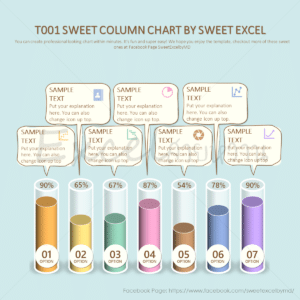


T005 Sweet Bar Chart
฿179.00 Original price was: ฿179.00.฿159.00Current price is: ฿159.00.
Chart quantity: 1-7 bars (max)
Remark: Cannot add/increase the number of charts
- Single (Personal) License
ℹ For 1 person and personal use only.
For Multi-Users or billing under company name please email us at support@sweetexcel.com for quotation.
- Share
Product Details
- Bar Graph in Excel
📌 Compatible with Microsoft Excel 2013 and above.
📌 This file contains VBA (Macro) code—please enable macros before using the template. (See instructions in the ‘Videos’ menu.)
⚠️ Remark
📌 The graph may move slightly depending on each computer setting/specification. This can be fixed simply
by clicking the unlock button and adjusting the graph manually.
📌 If your computer doesn’t have the font specified in the template, the display may not exactly match the image shown. However, most of our templates use the font that comes with Microsoft Office 365.
✅ Graph automatically adjusted according to input numbers.
✅ Change input format (Number, Currency, Percentage).
✅ Label and Sub-label change automatically according to the input.
✅ Hide Icon, Textbox, Data Label, Sub Label.
✅ Add/remove graphs automatically according to the input.
✅ Move different parts of the graph conveniently by pressing buttons.
✅ Change the chart color and change back to the default color conveniently by pressing buttons.
✅ Fill gradient color in the Label box.
✅ Change the color of the back chart.
✅ Swap color palettes left and right which effect color swap on the graph.
✅ Change the color of the back chart to the selected color (same with font chart color) or white.
✅ Change the logo color tone, light/dark.
✅ Change the color tone of the Data Label, light/dark.
✅ Change the color tone of the Sub Label, light/dark.
✅ Add images and icons.
✅ Copy all charts and paste them into PowerPoint or other programs.
📖 A detailed user manual is in the file (In Thai but buttons are in English and easy to understand).
✅ In addition to the automatic buttons, able to unlock to move or modify parts of the graph as needed.
✅ Suitable for Advance users only, please proceed carefully as it may cause an error.
❌ Can’t add more charts or insert rows/columns on the Template sheet.
❌ VBA code is locked and cannot be edited.
🎥 Related videos
📌 How to Enable Macro (First-time use)
https://youtu.be/1xylozkx4NA
📌 Beginner’s usage guide
https://youtu.be/ipLadGzGriE?si=MUxeHECRPxhSfaxI
📌 Implementation ideas
https://youtu.be/vI6X8VFN1ss?si=0TDF9nXUr1UEYOMT
You may also like...
Related products
- Sale!

T017 Sweet Column Chart
฿179.00Original price was: ฿179.00.฿159.00Current price is: ฿159.00. Add to cart - Sale!

T010 Sweet Column Chart
฿179.00Original price was: ฿179.00.฿159.00Current price is: ฿159.00. Add to cart - Sale!

T006 Sweet Combo Chart
฿179.00Original price was: ฿179.00.฿159.00Current price is: ฿159.00. Add to cart - Sale!

T001 Sweet Column Chart
฿179.00Original price was: ฿179.00.฿159.00Current price is: ฿159.00. Add to cart